iPhone
Small Skies
One big temperature, over a village that changes with the sky.
$2.99, paid once, when it reaches the App Store·iPhone, iOS 18 or later·No subscription, no account
What Small Skies does
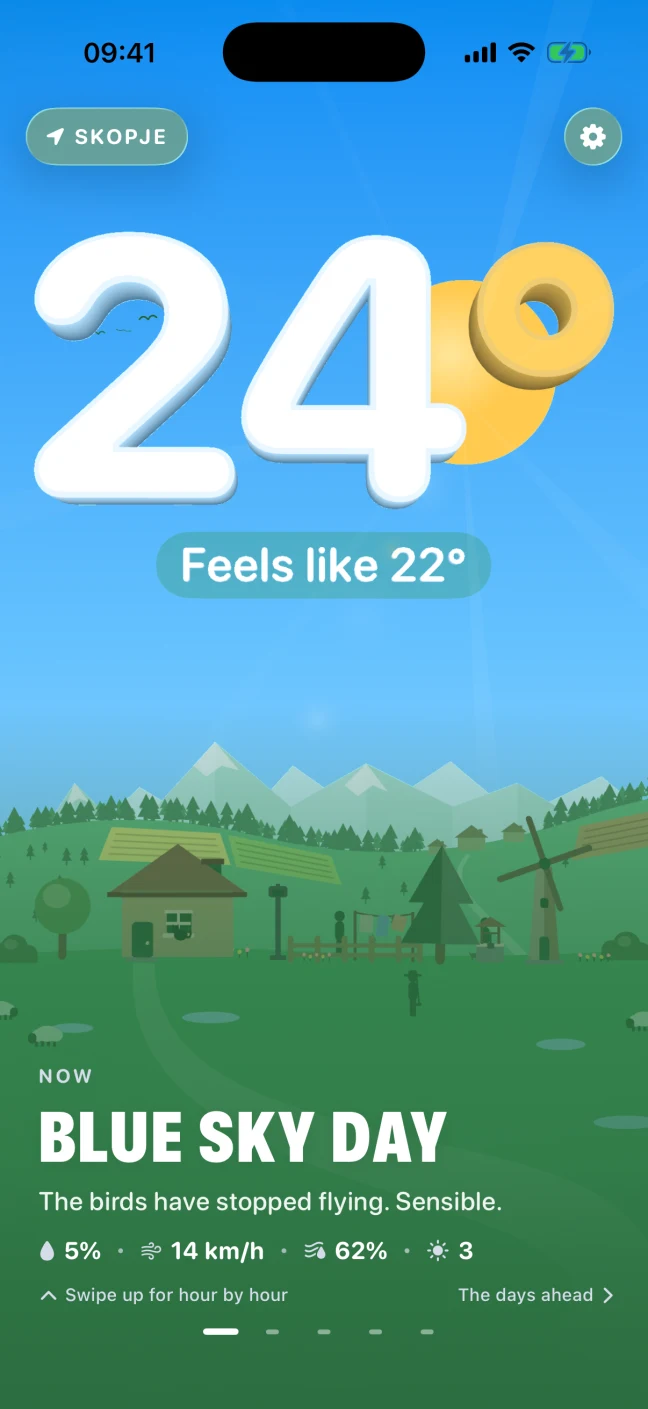
I wanted a weather app I could read from the other side of the kitchen. Most of them put the temperature in the middle of a page of smaller numbers, and I only ever look at the one. So in Small Skies the temperature takes up most of the screen. It is a lit, extruded number floating over a small village, and you can drag anywhere to turn it. Holding it switches between Celsius and Fahrenheit.
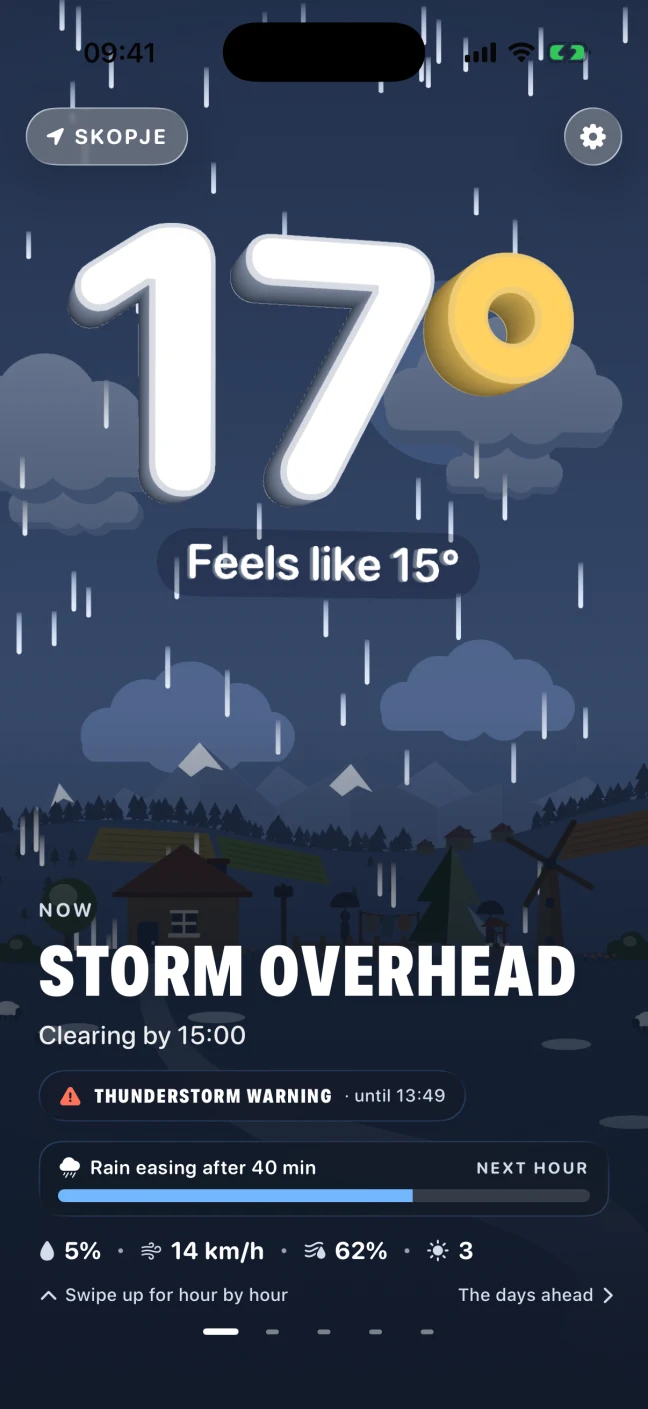
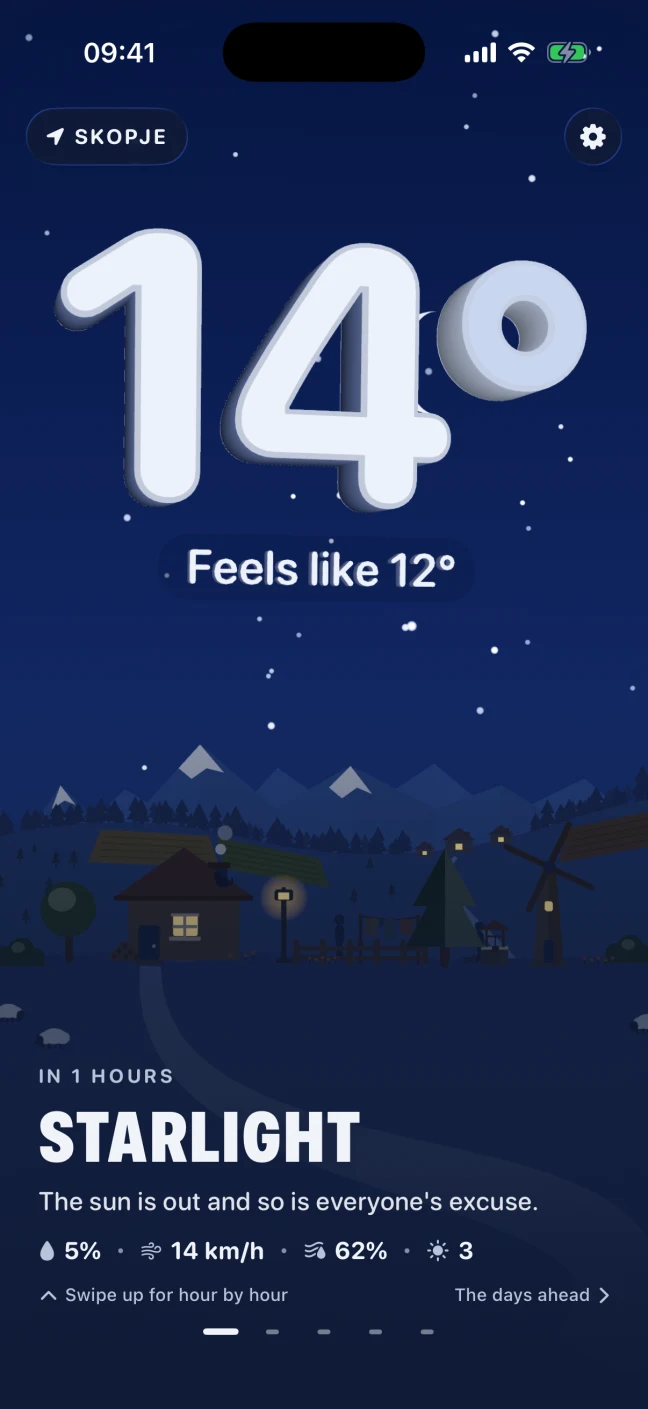
The village under the number does whatever the sky is doing. When it rains, the rain falls past the number and lands on the ridge. When it snows, the roof goes white and the number frosts over. Fog hides the far hills before the near ones. The app knows when the sun sets where you are, so the scene goes through a real dusk, and at night there are stars and the number turns silver.
The rest of the forecast is a swipe away. Swiping up shows rain minute by minute for the next hour, where Apple Weather has radar for that, and then the next 24 hours, which you scrub through with a thumb while the village changes to match. Further along are ten days, a sun and moon page and an air page with the humidity, wind, pressure and UV in large type. If there is an official weather warning for your area, it appears under the headline with the time it ends. There is no account, and the only thing the app sends anywhere is the forecast request to Apple.
The parts worth knowing about
Not the whole list - the app has more screens than a page like this can usefully hold. These are the decisions that make Small Skies different from the last one you tried.
-
A temperature you can turn
The number is a real 3D object with a camera in front of it. Drag anywhere on the screen and it turns, the clouds move with it and the hills slide the other way. Hold it for a moment and the whole app switches between Celsius and Fahrenheit.
-
One village, every sky
The same cottage and windmill sit under clear sky, cloud, rain, snow, thunderstorm, fog and wind, by day and by night. The weather happens in the scene instead of being an icon next to a number.
-
Dusk at the real time
The app uses the sunrise and sunset for where you are, so the sky goes through golden hour and blue hour at the right time of day. After dark the stars come out, the cottage lights its window and the number turns silver.
-
The next hour, minute by minute
Where Apple Weather has radar coverage, a bar under the headline says when the rain will ease or start. Below it are the next 24 hours, which you scrub through with a thumb while the village changes to match the hour.
-
Warnings where you already look
When the weather authority for your country issues a warning, it appears under the headline with the time it ends, so you see it on the first screen rather than in a menu. During a thunderstorm the lightning lights up the number too.
-
Sun, moon and the air, drawn large
One page draws sunrise, sunset, the length of the day and the phase of the moon as a single arc. Another shows feels like, humidity, wind, pressure, UV, visibility and cloud cover in type big enough to read from across a table.
-
Thirteen widgets, forty landscapes
There are small, medium and large widgets for the Home Screen and circular, rectangular and inline ones for the Lock Screen. You can move the village into any of forty landscapes, a fjord or a desert among them, and keep up to ten places, each showing its own sky.
-
Nothing leaves the phone except the forecast request
There is no account, no analytics, no ads and no third-party code in the app. If you allow location access, your coordinates go to Apple Weather to fetch the forecast and nowhere else. If you would rather not, you can add cities by name instead.
Small Skies, running
Pricing
One price, and it buys the whole app. Until the App Store listing is live, I am sending out TestFlight invites by email, and a TestFlight build costs nothing.
- Small Skies$2.99
Paid once, on the App Store when it arrives. Not a subscription, and there is no second tier.
- Every screen, every widget, every landscape
- Every update after it
- No account, no analytics, no ads
- Your location goes to Apple Weather and nowhere else
What you need
- iPhone
- iOS 18 or later
- Devices
- iPhone only. There is no iPad, Mac or Apple Vision build.
- Latest version
- Build 29, on TestFlight
- Where it comes from
- The App Store, once approved. Until then, a TestFlight invite from the product's site.
- Weather data
- Apple Weather, the same service behind the built-in Weather app, including government warnings and minute-by-minute rain where radar coverage exists.
- Location
- Optional. Coordinates go to Apple Weather to fetch the forecast and nowhere else. Without it, add up to ten cities by name.
- Account
- None. There is nothing to sign up to.
- Languages
- Eleven, Macedonian included.
Questions about Small Skies
Is Small Skies a subscription?
No. It will be $2.99 on the App Store, paid once, and every update after that is included. There is no second tier and nothing to buy inside the app.
Can I have it today?
Not from the App Store yet. Build 29 is on TestFlight, and the product's site will send you an invite by email if you ask.
What does it run on?
Any iPhone on iOS 18 or later. There is no iPad, Mac or Apple Vision build.
Where does my location go?
To Apple Weather, which returns the forecast, and nowhere else. There is no account and no analytics in the app. You can also skip location access and add up to ten cities by name.