Nameglow
Rename a whole batch. Check every change first.
- Free for 10 files per batch; Pro $19 USD once
- macOS 13 or later
- Apple silicon and Intel
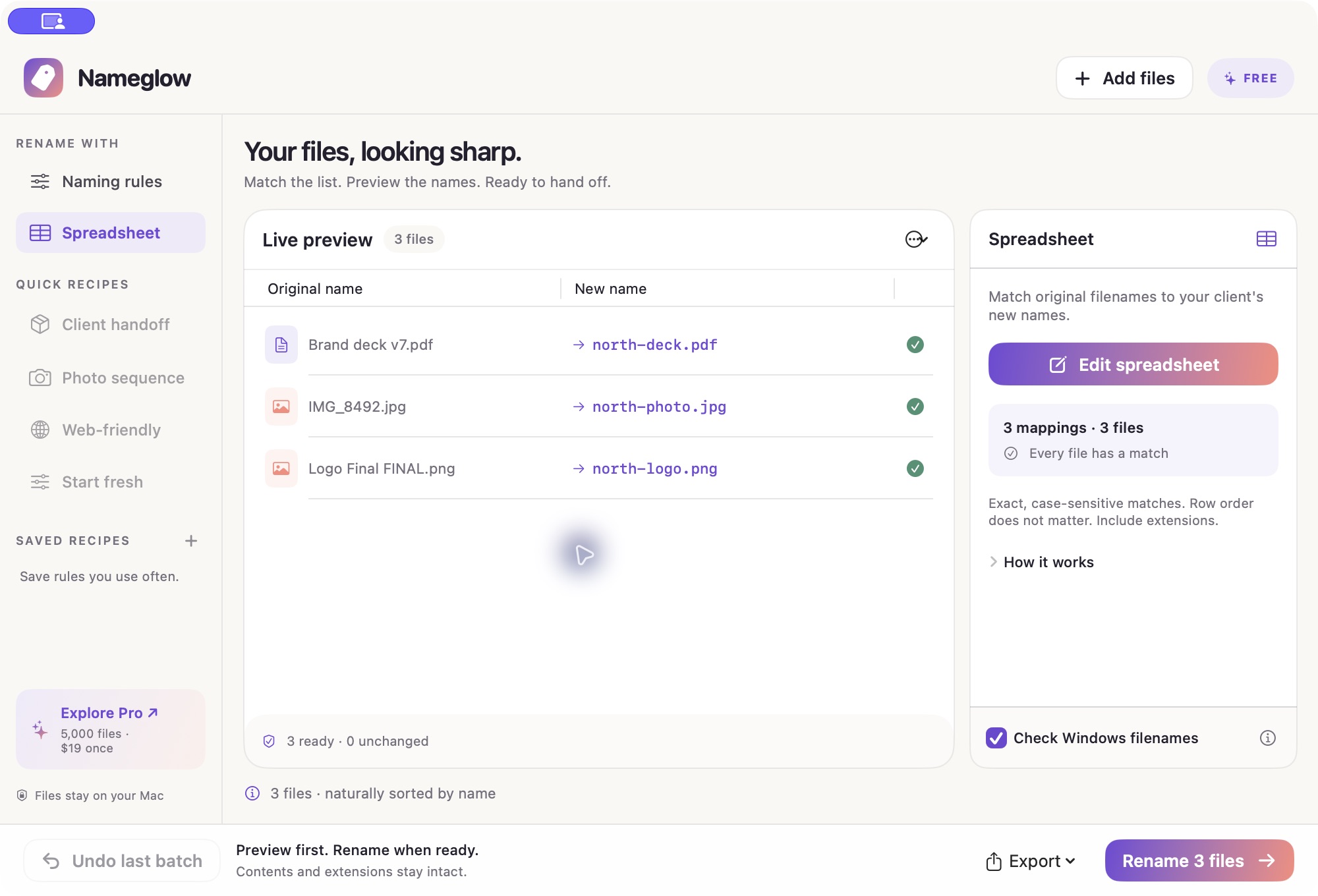
Nameglow, running
What Nameglow does
A folder of final_FINAL filenames takes too long to fix one file at a time. Drop it into Nameglow, choose a naming recipe and check the original and proposed names side by side before you rename.
For client handoffs, paste an old-name/new-name spreadsheet or import CSV or TSV. Nameglow matches by the original filename, so the row order does not matter. Resolve missing matches or conflicts, rename the batch and save a receipt of what changed.
What you can do
-
Use the spreadsheet you already have
Paste two columns from your spreadsheet, or import a CSV or TSV file. Nameglow checks for missing, duplicate and unknown names before you apply the mapping.
-
Save the rules you repeat
Combine a base name, find and replace, prefixes, suffixes, case, separators and numbering. Save the combination as a recipe for the next batch.
-
Preview before you rename
Read the original and proposed names together, and resolve filename conflicts before applying changes. Turn on Windows filename checks when preparing a cross-platform handoff.
-
Keep a receipt and an undo
Export an HTML preview or a receipt of the completed rename. Undo the most recent batch, including after relaunch. File contents and extensions stay intact.
Pricing
Start with the free download. Buy Pro through Polar and paste the license key into the app when you need larger batches. Applicable taxes appear at checkout.
- Nameglow FreeFree
Up to 10 files per batch. All naming features included.
- Rules and saved recipes
- CSV and TSV matching
- Preview, Windows checks, HTML reports and last-batch undo
- Nameglow Pro$19
USD, paid once. Up to 5,000 files per batch.
- Everything in Free
- One person, on their own Macs
- Version 1 updates included
What you need
- Mac
- macOS 13 Ventura or later, on Apple silicon or Intel.
- Files
- Regular files in the folders you choose. Subfolders, hidden files and links are skipped.
- Privacy
- Files and rename processing stay on your Mac. The app has no analytics.
- Internet
- Free use works offline. Pro needs internet for initial license validation, then uses a verified license stored in Keychain.
- Download
- Developer ID signed and Apple notarized. Download the disk image from the Nameglow website.
Questions about Nameglow
How much does Nameglow cost?
- Free includes all naming features for up to 10 files per batch. Pro costs $19 USD once for up to 5,000 files per batch, for one person on their own Macs, with version 1 updates. Applicable taxes appear at checkout.
Can I rename files from Excel or Google Sheets?
- Yes. Paste two columns of old and new names, or import CSV or TSV. Matching uses the original filename, not row order. Resolve missing, duplicate or unknown names before applying the batch.
Can I undo a rename?
- You can undo the most recent batch, including after relaunch. Nameglow changes filenames while preserving file contents and extensions.
Do my files leave my Mac?
- No. File processing stays on your Mac, and the app has no analytics. Pro activation sends your license key to Polar for validation.